
I paid, but my report credits are missing. What should I do?
Check your payment and account before buying again.
Our Terms of Service say credits are added to your account within 60 minutes of your payment being received.
Make sure you sign in with the same account you registered and paid with. Credits are added to that account only, so another account will not show them.
Make sure you are signed in when you run a search, so the search can use your credits.
Check your purchase
- Check your receipt and the email address you used at checkout.
- Sign in with the account linked to that purchase.
- If the credits are still missing after 60 minutes, contact support with your Order ID or receipt, and the time you paid. You can find the Order ID in the email we sent when you paid.
Tell us whether you bought through the website or through Apple. Please do not make another purchase just to see whether your balance updates.
Could your credits have expired?
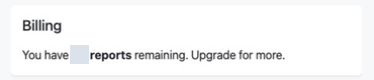
Report credits, shown as reports remaining on your Billing page, are valid for 30 days from purchase. Any you have not used by then expire and are removed from your account, unless a special offer or our support team has told you otherwise.
Contact supportReferences: Terms of Service
Reviewed 29 September 2026